
Last updated: November 2026
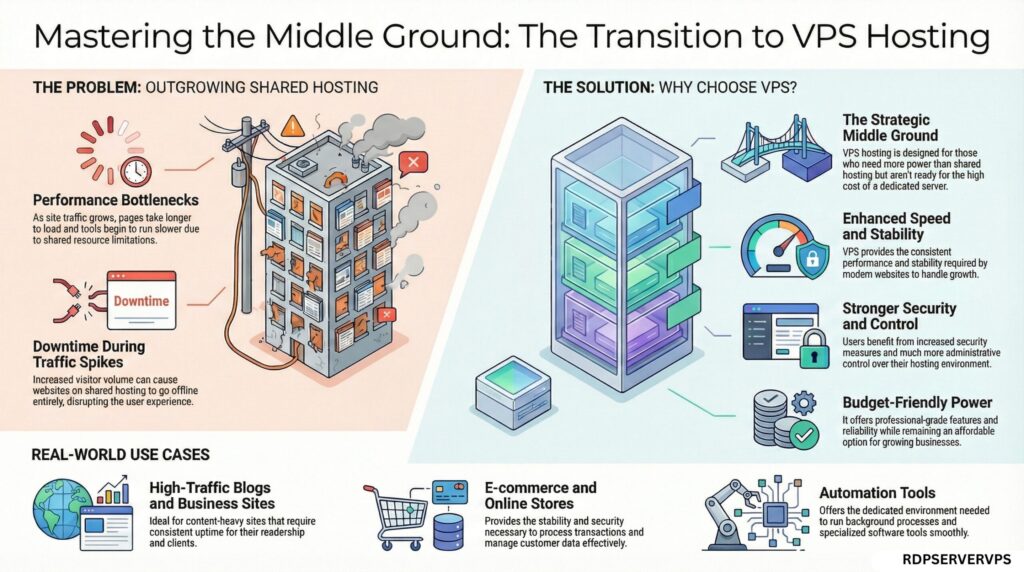
Shared hosting works until your site grows. Then pages slow down and traffic spikes can take it offline.
VPS hosting is designed for websites and online projects that have outgrown shared hosting but aren’t ready for the high cost of a dedicated server. It offers better speed, stronger security, and much more control while still staying budget-friendly.
What Is VPS Hosting?
VPS stands for Virtual Private Server. Simply put, VPS hosting is a web hosting service where a single physical server is divided into several independent virtual servers. Each virtual server operates like a standalone machine with its own operating system, allocated CPU power, RAM, and storage resources.
A VPS gives you a private server environment inside a larger physical server. It sits between shared hosting and a dedicated server in both price and power.
How VPS Hosting Works Behind the Scenes
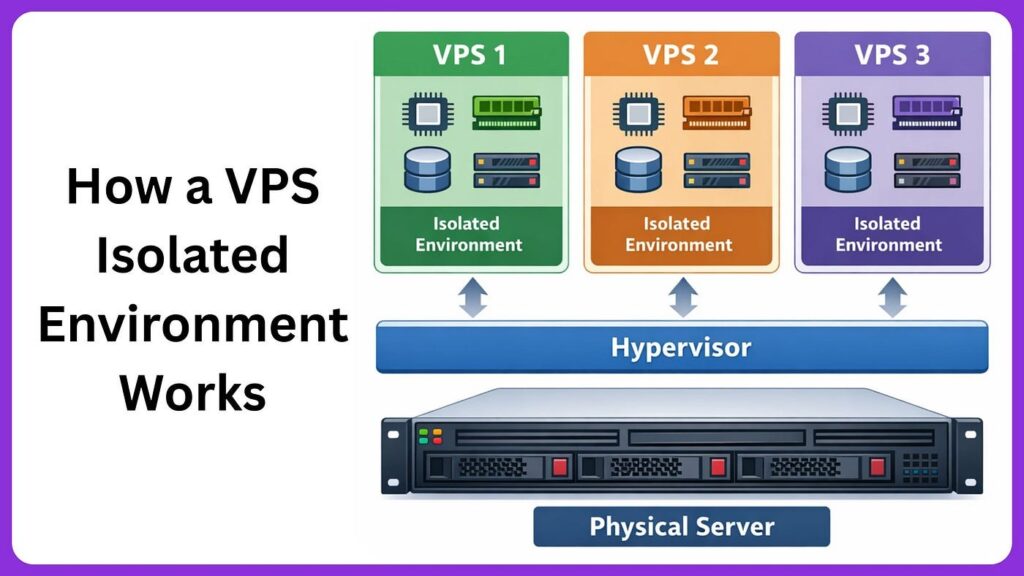
A powerful physical server runs special virtualisation software that allows it to be split into several virtual machines. Each virtual machine becomes its own VPS.
Every VPS has:
- Its own operating system (Linux or Windows)
- Allocated CPU resources based on the selected plan
- RAM allocation according to the selected plan specifications:
- Separate storage space
Even though all VPS instances live on the same physical machine, they remain isolated from one another. One user’s traffic spike or software issue rarely affects other VPS instances on the same server.
Think of it like renting an apartment. You share the building structure, but your apartment has its own rooms, electricity, and privacy. That’s exactly how a VPS works.
Types of VPS Hosting
Managed VPS Hosting
With managed VPS hosting, the hosting provider handles the technical side for you. This includes server setup, security updates, monitoring, performance optimisation, and backups.
It’s ideal for:
- Beginners
- Business owners
- Bloggers
- eCommerce stores
Unmanaged VPS Hosting
With unmanaged VPS hosting, you control everything yourself. You install the operating system, configure security, manage software, and monitor performance.
This option is best for:
- Developers
- System administrators
- Advanced users
It offers maximum flexibility but requires technical knowledge.
VPS Hosting vs Other Hosting Options
| Hosting Type | Resources | Performance | Control | Cost (per month) | Best For |
| Shared Hosting | Shared among many users | Low to moderate | Very limited | About $2-10 | Small blogs and beginners |
| VPS Hosting | Allocated virtual resources | High and stable | Full control | From $4.99 | Growing websites and businesses |
| Dedicated Hosting | Entire physical server | Very high | Complete control | From about $80 | Resource-heavy apps, game hosts, high-compliance workloads |
| Cloud Hosting | Multiple connected servers | Highly scalable | Moderate to high | Pay-as-you-go, varies with usage | Traffic-heavy projects |
Many VPS plans run on cloud infrastructure, so the two overlap. The main difference is billing: a VPS usually has a fixed monthly price, while cloud hosting often charges for what you use.
Why VPS Hosting Is So Popular Today
Better Speed and Performance
Your site gets its own allocated CPU and RAM, so a traffic spike on someone else’s site is far less likely to slow yours down. Pages load faster and background tasks keep running smoothly. For example, a store that slows down during a sale on shared hosting can stay fast on a VPS.
Stronger Security
Shared hosting is risky because one infected website can affect others on the same server. On a VPS you control the firewall and security settings, but you or your host must still patch, firewall and back up the server.
Full Control Over Your Server
A VPS gives you control over what runs on your server. You can install custom software, choose your operating system and tune server settings for your project. For example, you can install Docker, Node.js or custom firewall rules, which shared hosting usually does not allow.
Easy Scalability
As your website grows, you can upgrade your VPS resources without moving to a new host. On our plans you can upgrade RAM, CPU and storage from the panel.
Affordable Power
Many people assume VPS hosting is expensive, but plans start from $4.99/month, far less than a dedicated server. Explore our UK cloud VPS or Miami cloud VPS plans.
Real-Life Use Cases of VPS Hosting
So what is VPS hosting used for in real life?
High-Traffic Websites
News sites, popular blogs, and content platforms that outgrow shared hosting.
Online Stores
Fast checkout, strong security, and stable performance for customers.
Automation Tools
SEO tools, bots, background scripts, and data processing.
Web Applications
Dashboards, SaaS platforms, APIs, and custom software.
Game Servers
Private multiplayer environments.
Development Environments
Testing, staging, and software development projects.
Understanding VPS Hosting Resources
CPU Processes requests and runs your applications. More cores help when many visitors or tasks run at the same time.
RAM Holds the data your active apps use. If RAM runs out, the server slows down or the system may stop processes.
Storage Holds your files and databases. SSD storage reads and writes much faster than older hard disks.
Bandwidth The amount of data your server can transfer each month. See what a provider’s bandwidth and backbone numbers actually mean before comparing plans.
A typical WordPress site runs well on 2 vCPU and 2-4 GB RAM.
When Should You Move to VPS Hosting?
You should seriously consider VPS hosting if:
- Your website feels slow
- Traffic is increasing
- Shared hosting limits are holding you back
- You need better security
- You want more control
Move to a VPS when you see resource-limit errors, TTFB over ~800 ms, or CPU throttling warnings in your control panel.
Common VPS Hosting Challenges (And How to Handle Them)
Server Management
A VPS needs regular upkeep: updating the operating system, patching software and checking that services restart after a reboot. On a managed VPS your host does this for you; on an unmanaged VPS it is your job. Schedule weekly backups so you can restore quickly after a mistake.
Security Configuration
Start with four steps: disable root SSH login, use SSH key authentication instead of passwords, enable a firewall (such as ufw on Linux or Windows Firewall) and turn on automatic security updates. Then close any ports you do not use.
Performance Monitoring
Check CPU, RAM and disk usage at least once a week. If usage stays above 80%, or you see slow responses and resource-limit errors, it is time to optimise your site or upgrade your plan. Tools such as htop on Linux or Task Manager on Windows show this in seconds.
How to Choose the Best VPS Hosting Provider
Look for:
- SSD storage
- Clearly stated resource allocation
- High uptime (99.99%)
- Built-in security features
- Easy scalability
- Reliable customer support
Ask the provider for its uptime SLA in writing, and check if refunds apply when it is missed.
Final Thoughts
If your website is slowing down on shared hosting, upgrading to a VPS is the best move. You get better speed, stronger security, and full control over your server without paying for a pricey dedicated machine.
Whether you run an online store, a business site, or custom web apps, our VPS plans start at just $4.99/month with guaranteed RAM, CPU, and fast SSD storage.
Frequently Asked Questions About VPS Hosting
1. What is VPS hosting, and how is it different from shared hosting?
VPS hosting gives you your own virtual server with allocated CPU, RAM and storage. Shared hosting puts many sites on one pool. A VPS is more stable under load and gives you more control.
2. What is VPS hosting used for in real-world websites and applications?
A VPS can host a WooCommerce store, a Node.js API, a game server, or a staging site, each with its own resources.
3. Is VPS hosting suitable for beginners with limited technical knowledge?
Yes, if you pick managed VPS. The host handles updates, backups and security, and you usually get a control panel such as cPanel.
4. How do I know when it’s time to upgrade from shared hosting to VPS hosting?
Consider upgrading when pages slow down under normal traffic, you see resource-limit errors, or you need software that shared hosting does not allow.